Reverse-Engineering a Legacy Application
with AI - One Step at a Time
Introduction
Every large organisation has one: a system that quietly runs an important part of the business, whose know-how now lives mostly in the code itself, and that has to move to a modern platform. I recently started on one of those at a leading Canadian bank. The first job was not writing code. It was finding out what the existing system actually does.
AI coding assistants looked like the obvious shortcut. They read code faster than any person, and they explain unfamiliar constructs in plain language, which matters a great deal when you are new to the technology.
However, the obvious approach breaks down quickly. Asking an assistant to "explain the application" produces a confident, shallow summary you cannot defend in a review. The text is fluent but hard to trace: you cannot tell what was read from the code and what was guessed. And one convincing mistake can quietly shape every decision that follows.
To get real value from AI across a whole application, I needed a method, not a prompt. It had to break the work into small, checkable steps, make every claim show its evidence, and turn unknowns into questions with owners.
In this post, I walk through that method: the playbook of scoped prompts, the evidence tags and second-model reviews that made the output trustworthy, and how the regression test pack and a gap register anchored everything to what the business actually cares about. I have kept the system, the organisation and the design anonymous on purpose. The method is the interesting part.
The Starting Point
The application was built with a desktop development tool that was popular in the 1990s and 2000s. It has served the business reliably for many years, and the plan is to rebuild it as a modern web application in the cloud.
Here is what I had to work with:
- No current documentation. The source code was the reference.
- Several source repositories, with a few components available only in compiled form.
- One regression test spreadsheet from an earlier project, with a couple of hundred test cases and screenshots.
- A modern-stack background, not one in that older tool.
All work on the source code was done within the project's own environment, using the tools approved for it.
The Playbook
Instead of one big prompt, we wrote a playbook: a sequence of small, scoped prompts, each producing one Markdown document that the next prompt builds on. The order matters, because each step narrows what the next one has to read.
- Inventory: what files exist, what kind they are, and what is readable.
- Architecture: how the application starts, connects and signs users in, and how the repositories relate.
- Business areas: a one-page map of the main application, grouped by what users actually do.
- Ground truth: what the regression test pack says the business cares about.
- Core lifecycle: the statuses a record moves through and the rules that block each move.
- End-to-end journey: from setup, through day-to-day use and background processing, to archive.
- Synthesis: an overview for stakeholders and a scope for a demo.
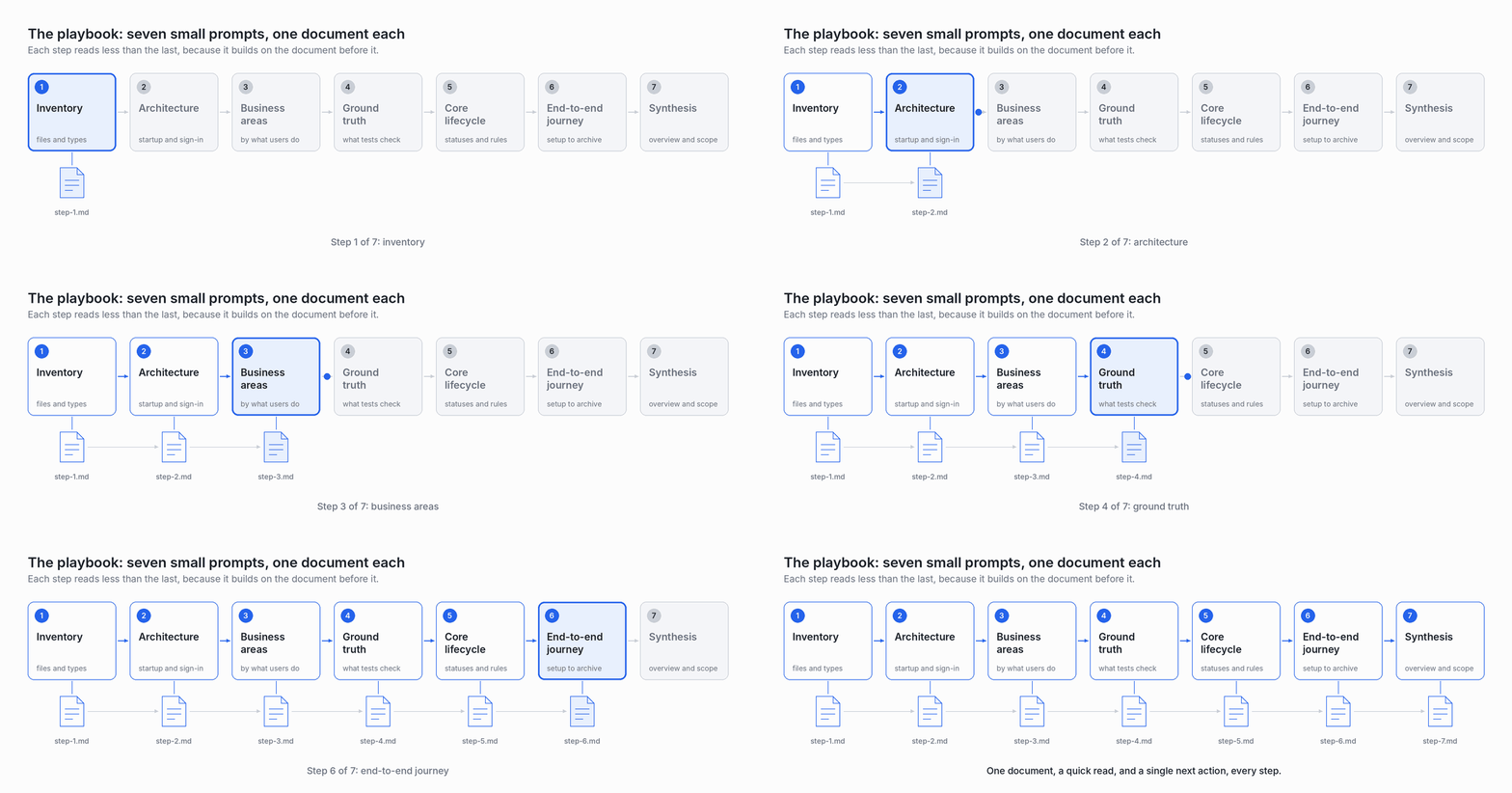
Figure 1: The playbook. Each step produces one document, and the next step builds on it.
Working Habits
Three habits made the playbook work in practice.
- Scripts for counting, AI for reading. Anything that is counting or listing (files per folder, object types, which libraries each program uses) went into a small script. A script costs nothing to re-run and never invents a number. My first attempt at having the assistant write the script produced one that reported success without writing any output, so I replaced it with a simpler script and checked its output by hand. AI is better at reading code than at bookkeeping.
- A standing instructions file. The assistant reads a repository-level instructions file on every request, so the rules lived there once: cite the file for every claim, never invent tables or screens, flag anything referenced but missing, and explain legacy concepts in one plain sentence for a reader new to them.
- One step at a time. I am not a developer in the original technology, and a wall of findings is useless when you cannot judge it. Every step ended with one document, a quick read, and a single next action. When the output got too long to read, the next prompt asked for a short summary first.
Building Trust
The hard question with AI-generated documentation is not "is it fluent?" but "which parts can I stand behind in a review?" Two practices answered that.
Evidence Tags and Citations
Every claim carries a tag and a citation to the file and function it came from.
| Tag | Meaning |
|---|---|
| [CONFIRMED] | Seen in the code, with the file and function cited |
| [INFERRED] | A reasonable reading of the code that a person still needs to confirm |
| [UNKNOWN] | Not established by the code; needs a human answer |
This sounds bureaucratic, but it changed the conversation. Instead of arguing about whether the AI was right, we could see exactly which statements rested on code and which were educated guesses.
Second-Model Review
After each key document was written, a fresh session using a different model reviewed it sceptically:
- Pick the fifteen most important claims in the document.
- Open the cited files for each claim.
- Mark each claim YES, NO or PARTLY.
- Record the result as a baseline line at the top of the document.
Across the three most important documents:
- 35 of 45 checked claims were correct as written.
- 9 needed a qualification, for example a rule that applied to only one kind of user.
- 1 was wrong, and it mattered: the AI had misdescribed how one key business action behaves.
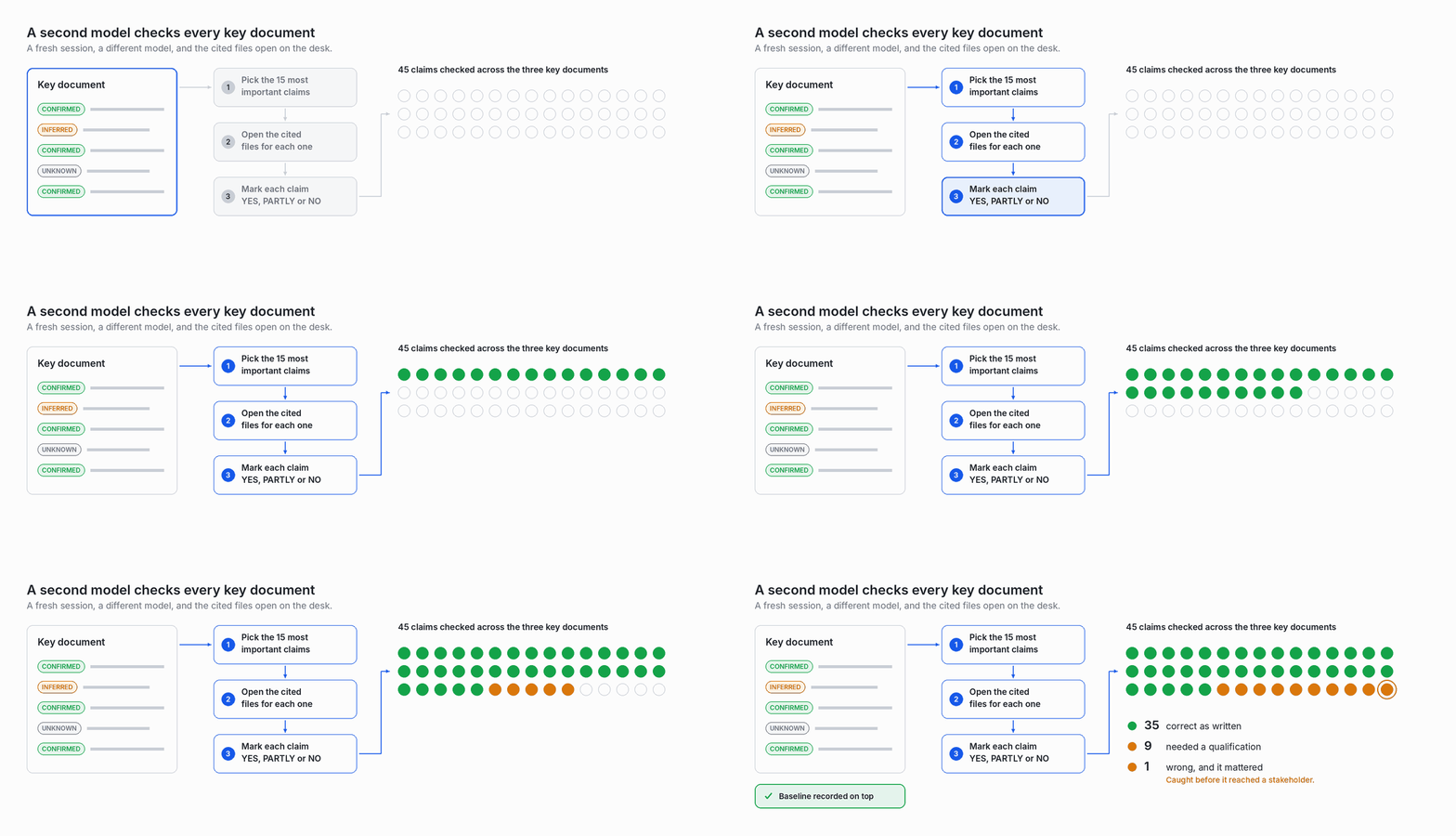
Figure 2: The second-model review, and its results across the three key documents.
That one NO justified the whole exercise. It had already crept into my own understanding, and the review caught it before it reached a stakeholder. The reviews also raised good questions for the business, and those went straight into the gap register.
Ground Truth
Code tells you what a system can do. Two other sources told us what the business needs and what we still did not know.
The Test Pack
A test pack tells you what the business actually checks. Exporting the spreadsheet to CSV (and pulling the screenshots out separately, because an .xlsx file is just a zip) let the assistant group a couple of hundred test cases into business areas.
The distribution was the most useful single chart of the project. It showed where the business spends its attention, and it pointed straight at the core of the application.
The same test cases later became the starting point for 26 acceptance tests for the demo, written as Given/When/Then with the original error messages. The new system can now be judged against behaviour users already know.
The Gap Register
Reverse-engineering any long-lived system produces as many questions as answers. Instead of letting them scatter across documents, every one went into a single register that records:
- What is missing or contradictory.
- How much it matters.
- Who can answer it: the DBA, the platform team, the business owner, or a former developer.
The questions were grouped by person at the bottom, ready to email. A few of them involve decisions that could significantly change the scope of a migration, which is exactly why they belong in front of the business early, not discovered halfway through a build.
From Documents to a Working Demo
Starting from no documentation, we finished with:
- A complete inventory of the source code, with anything not available as readable source clearly listed.
- A map of the application by business area, and an explanation of how its separate programs fit together.
- The core lifecycle and the end-to-end journey written down, with the rules that govern them, and independently checked against the code.
- A gap register of open questions, each with an owner.
- A plain-English summary for non-technical stakeholders, and an MVP specification with screens, rules, acceptance tests and database scripts built from the real column definitions.
Then we used it. A small working demo of a core workflow on the new platform was reviewed against those documents. The review found that its business rules lived on the server, as they should, and it produced a short list of improvements, all made before the demo.
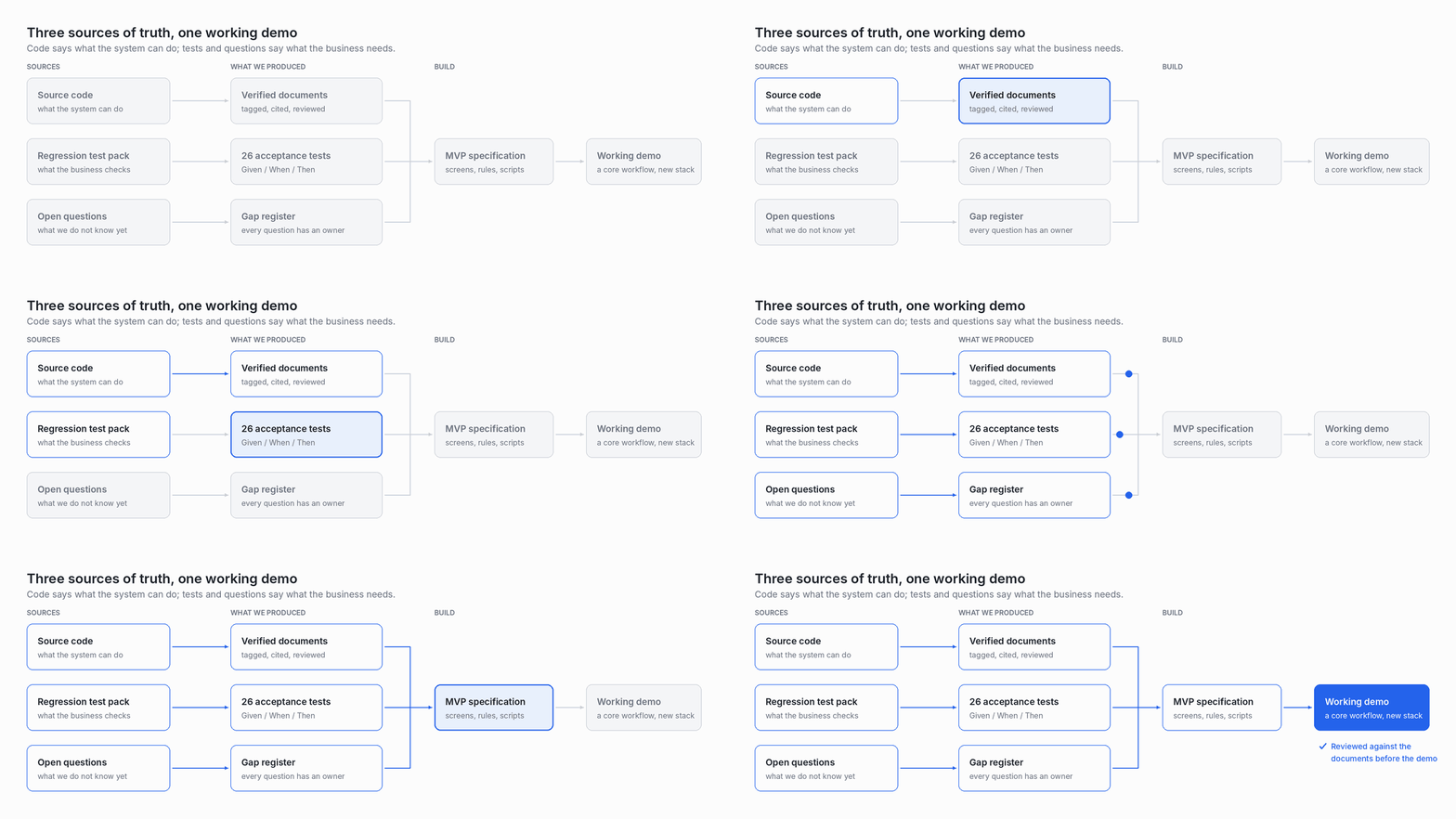
Figure 3: From three sources of truth to a working demo.
Handover
The last step was a handover. Everything went into Markdown files with a short briefing file at the top, so a new AI session could pick up the project with full context instead of starting cold.
What Came Next: From Playbook to Agent Kit
The playbook worked, but running it by hand meant I was the one keeping track: which step came next, which claims still needed checking, and what we had already decided. So the next version turned the playbook into a small kit of custom agents inside our AI coding assistant:
- A coordinator that plans the work and hands out one step at a time.
- A researcher that reads the code but cannot change it.
- A verifier that checks the researcher's work before it is accepted.
Alongside them sit three plain files: a backlog of work still to do, a lessons file, and a decisions log, so nothing learned in one session is lost in the next.
The seven steps also became twelve smaller phases, from an inventory at the start to tests and an overview at the end. After the prototype, we plan to rerun the whole analysis from zero with the kit, this time with a working demo to check it against.
Benefits of the Approach
Compared with reading the code by hand, or asking an assistant for one big summary, the method delivered:
- Speed: a verified picture of the application in a few focused days.
- Traceability: every claim tagged and tied to a file, so reviews focus on evidence, not opinion.
- Early risk discovery: a convincing error caught before it reached a stakeholder, and scope-changing questions raised in week one.
- Business alignment: acceptance tests drawn from what users already check.
- Continuity: a handover pack that lets the next person, or the next AI session, start with full context.
Lessons Learned
- Ask small questions. Scoped prompts, one document each, in a deliberate order. "Explain the app" is the least reliable prompt you can write.
- Use scripts for anything you count. Inventories, cross-references and column lists are a script's job. The AI reads; the script tallies.
- Make the AI show its evidence. Citations plus CONFIRMED / INFERRED / UNKNOWN tags turn fluent text into something you can defend.
- Check important work with a second model. It will not catch everything, but it catches the mistakes that sound most convincing.
- Treat the test pack as ground truth. It tells you what the business values, and it becomes your acceptance criteria for free.
- Write the unknowns down, with owners. A gap register is the most useful thing you can hand a business owner in week one.
- Discipline beats speed. Small steps, written outputs and short summaries felt slower, but they made the result better.
- Go one step at a time. You do not need to be an expert in the old technology, but you do need to understand each step before taking the next.
Conclusion
What began as knowledge locked inside an undocumented codebase is now a verified, shareable picture of the application, and a working demo built on it.
The core insight was simple: AI is most useful when it is asked to show its working. Small questions, cited answers and a second opinion turned a fluent assistant into a source I could defend in front of stakeholders.
None of this replaces the people who know the system. An hour watching a real user, and the answers in the gap register, still carry the most weight. But if you are facing a legacy system with no documentation, the hardest part is not the AI. It is building the discipline around it, so that what it tells you is something you can trust. I hope the method described here is useful to others facing the same problem.
About the author
- I am an Engineer in love with software and writing code. I am super passionate about the reach of technology, and when it comes to conquering new frontiers, I want to be there in the forefront.
Comments
Join the discussionNo comments yet. Be the first to comment.